PlayStation Portable · PTF & CTF themes

Preview the four preserved PSP themes and match each PTF or CTF file to its firmware and CXMB requirements.

PTF & CTF themes

Preview the four preserved PSP themes and match each PTF or CTF file to its firmware and CXMB requirements.

Material Design Tiny White · original project artwork
JohnEdwa (as named in distributed file); hosted by pspunk · preview hosted by pspunk
ThemesPTF

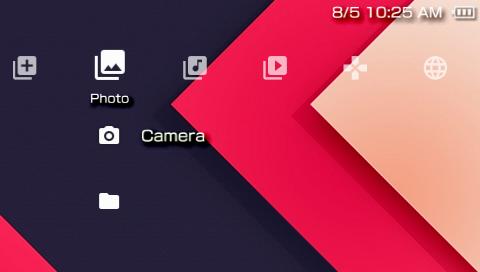
Material Design Tiny White

A compact Material-inspired XMB icon theme. Preview supplied by the theme distributor.

Requires: Distributor lists 6.60 and 6.61; official or custom firmware. No CXMB needed.

Installation & storage path

Copy the PTF to ms0:/PSP/THEME/ or ef0:/PSP/THEME/ on Go internal storage. Apply in Settings → Theme Settings → Theme.

Download MaterialDesignTinyWhite_JohnEdwa_v09.ptf

v0.9 (distributed file) · 0.24 MiB · PTF · PTF container header verified

SHA-256 & original file858087c4b06e60ba0edf482e14631043abbfcf878fc2a237b93b41bc4b30239f

Original download

clearXMB black · PTF · original project artwork
Original author unlisted by distributor; hosted by pspunk · preview hosted by pspunk
ThemesPTF

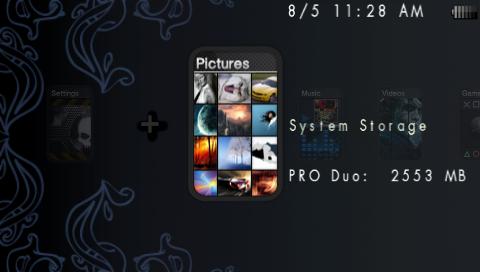
clearXMB black · PTF

Dark XMB icon theme using the PSP’s native theme format. Preview supplied by pspunk.

Requires: Distributor lists 6.60 and 6.61; official or custom firmware. No CXMB needed.

Installation & storage path

Copy clearXMBblack.ptf to ms0:/PSP/THEME/ or ef0:/PSP/THEME/. Select it in Settings → Theme Settings → Theme.

Download clearXMBblack.ptf

Distributor snapshot 2026-11-02 · 0.21 MiB · PTF · PTF container header verified

SHA-256 & original file0a43e3917096b0475f5a4c2c008c22a2183b94f3a2b1c8cd6a9ed99b0779da08

Original download

Jumbled · CTF 6.60 · original project artwork
Original author unlisted by distributor; hosted by pspunk · preview hosted by pspunk
ThemesCTF

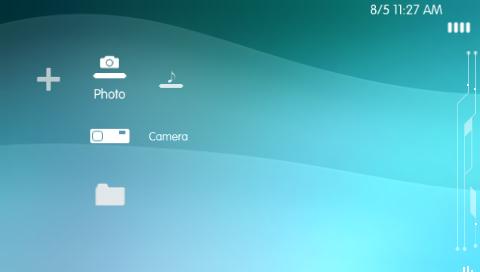
Jumbled · CTF 6.60

A full XMB layout theme. Keep this 6.60-labelled original separate from PTF themes and converted CTF builds.

Requires: File is explicitly jumbled660.ctf. Distributor lists its collection for 6.60/6.61; use on 6.60 CFW + CXMB. No independent 6.61/ARK-5 compatibility claim.

Installation & storage path

Copy to ms0:/PSP/THEME/ or ef0:/PSP/THEME/. Enable CXMB in VSH/XMB, restart VSH, then choose it in Theme Settings.

Download jumbled660.ctf

6.60 · distributor snapshot 2026-11-02 · 6.43 MiB · CTF · PTF container header verified

SHA-256 & original file8db608712ced0506d72be4972d2d769b7c3c6b1c34d8eb09eb2c96f18aa83563

Original download

Allure v2 · CTF 6.60 · original project artwork
Original author unlisted by distributor; hosted by pspunk · preview hosted by pspunk
ThemesCTF

Allure v2 · CTF 6.60

Alternative XMB styling with a matching distributor screenshot. This is the original 6.60-labelled CTF.

Requires: 6.60 CFW + CXMB for this allure.v2.660.ctf build. Distributor also lists 6.61, but that has not been independently hardware-tested here.

Installation & storage path

Copy to ms0:/PSP/THEME/ or ef0:/PSP/THEME/. Enable CXMB only for VSH/XMB, restart VSH and apply through Theme Settings.

Download allure.v2.660.ctf

v2 · 6.60 · 6.85 MiB · CTF · PTF container header verified

SHA-256 & original fileee6f45ae9d2e696456ae2edb2a0f9bed56f5720fd9d34b0d4963c6d89caf2a87

Original download

PTF and CTF setup

  1. PTF: use the PSP theme menuCopy a .ptf to PSP/THEME/ on the selected device and apply it in Settings → Theme Settings → Theme. The distributor lists the included PTF files for 6.60/6.61 on official or custom firmware.
  2. CTF: match firmware and install CXMBThe included originals are 6.60-labelled CTF files. Use compatible 6.60 CFW with CXMB; a theme’s file extension alone does not prove support for another firmware. Copy the CTF to PSP/THEME/.
  3. Enable CXMB in ARK-4Copy cxmb.prx into seplugins/cxmb/. In ARK Custom Launcher’s file browser, select the PRX, install it for VSH (XMB), and enable it. Restart VSH, then open Theme Settings. Do not register this XMB plugin as always or Game.
  4. Classic PRO/ME configurationFor those CFWs, the CXMB readme specifies ms0:/seplugins/cxmb/cxmb.prx 1 (or ef0:/seplugins/cxmb/cxmb.prx 1) as the first line of seplugins/VSH.txt. Restart VSH after changing it. ARK-4 has its own plugin manager and configuration format.