No matching projects. Clear filters to see the full library.
A complete, free platform adventure: guide Tux through the classic Milestone 1 levels.
- Compatibility
- Native Vita; exact firmware range and PS TV support not specified by author.
- Before installing
- Homebrew access and VitaShell. Game assets are bundled.
- Game data
- Standalone free game
Setup & storage paths
- Copy SuperTux-PSVITA.vpk to ux0:downloads/ and install with VitaShell.
- Open the SuperTux bubble from LiveArea. Saves and settings use ux0:data/supertux/.
ux0:data/supertux/
File details & SHA-256 · 1 file
SuperTux-PSVITA.vpk1.04 · 10,481,119 bytes
5edea0830269795b4531ef8e3903a08a84e260ffad72a986a80d20328c418510Official source file Icon: theheroGAC / DeltaResero / SuperTux team · original package icon
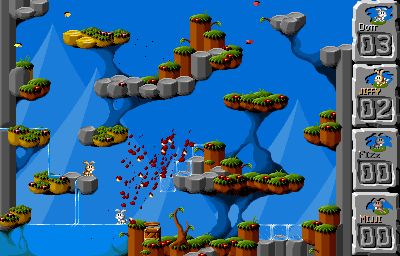
A fast multiplayer rabbit arena with local controller and Bluetooth keyboard support.
- Compatibility
- Native Vita; no exact firmware minimum published. Multiplayer only.
- Before installing
- Homebrew access, VitaShell and another player. Up to four players are supported by the port.
- Game data
- Standalone free game
Setup & storage paths
- Install jumpnbump_1.00.vpk with VitaShell; all required game data is included.
- Prepare multiplayer input, then open its LiveArea bubble. Move with the D-pad or stick and jump with an action button.
- The Vita build is 1.00. Release tag 1.02 contains later Switch changes; it is not Vita version 1.02.
File details & SHA-256 · 1 file
jumpnbump_1.00.vpkVita 1.00 (release tag 1.02) · 1,286,536 bytes
e58de95513d797f3d8c7a9cf27b2d0efa4c416506fca1d3b1b7a31f74f2112d7Official source file Icon: rsn8887 / Brainchild Design / Jump ’n’ Bump contributors · original package icon
Screenshot: rsn8887 / Brainchild Design · official port screenshot
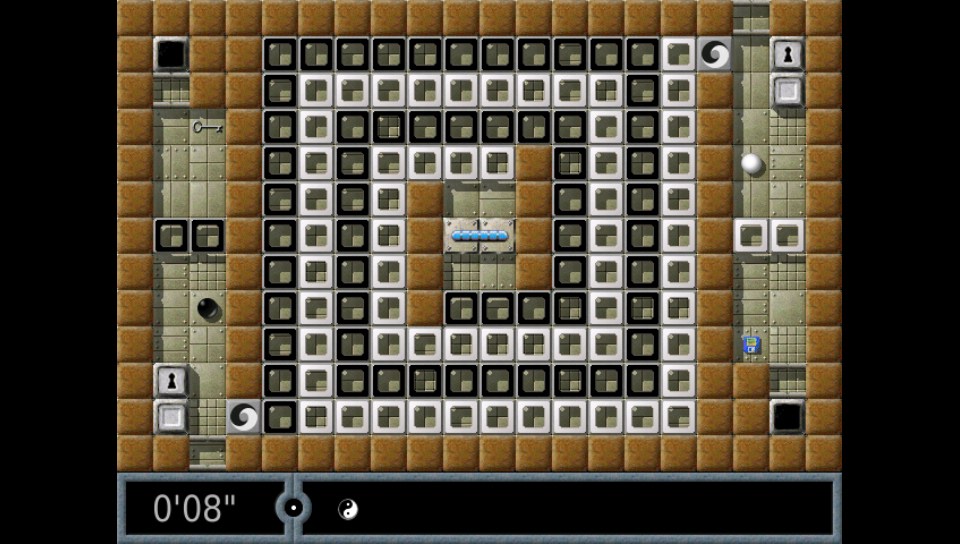
Marble puzzles built around matching hidden Oxyd stones, with mazes, traps and touch controls.
- Compatibility
- Native Vita; no exact firmware minimum or model restriction published.
- Before installing
- Homebrew access, VitaShell and the matching free data ZIP.
- Game data
- Free data pack required
Setup & storage paths
- Install enigma_1.11.vpk with VitaShell.
- Extract this project's data.zip into ux0:data/, retaining the enigma folder. Do not use Chocolate Doom's different data.zip.
- The author recommends FTP when transferring the many small data files. Vita remains 1.11; release 1.16 updates Switch only.
ux0:data/enigma/
File details & SHA-256 · 2 files
enigma_1.11.vpkVita 1.11 (release tag 1.16) · 5,209,786 bytes
13041d9edb54c45ae83c7289905315b9eccd616d81164bdd87d0eb78910fd7a7Official source file data.zipVita 1.11 (release tag 1.16) · 70,226,743 bytes
e997b169d3639f3759f840f4f3a7afcfb3129382ec9fe761511f99f6cf041becOfficial source file Icon: rsn8887 / Enigma team · original package icon
Screenshot: rsn8887 / Enigma team · official Vita screenshot
One native launcher for classic Doom, Heretic, Hexen and Strife engines, with shareware data available.
- Compatibility
- Native Vita; no exact firmware range or model restriction published.
- Before installing
- Homebrew access, VitaShell and release data.zip. Full games need your own IWADs.
- Game data
- Shareware included; full-game data supplied by you
Setup & storage paths
- Install ChocolateDoom_r3_1.vpk. The author marks Vita Release 3.1 as a pre-release.
- Extract its data.zip at ux0: so the data/chocolate folder lands at ux0:data/chocolate/. This includes Doom and Heretic shareware.
- Copy your own full-game IWADs to ux0:data/chocolate/iwads/. Put PWADs in the appropriate doom, heretic, hexen or strife subfolder under pwads/.
ux0:data/chocolate/iwads/ux0:data/chocolate/pwads/
File details & SHA-256 · 2 files
ChocolateDoom_r3_1.vpkVita r3.1 · 7,221,728 bytes
373915d5225d7f8cce9f52126a62f82e35a7324b666eed2456dd27a80fb6e74fOfficial source file data.zipVita r3.1 · 3,916,646 bytes
58fe4548dfa74748260044214b3fae76ef09d492d84d3768107867b3b6dbc6cfOfficial source file Icon: fgsfds / Chocolate Doom contributors · original package icon
The official native Vita emulator for Game Boy, Game Boy Color and Game Boy Advance.
- Compatibility
- Official Vita homebrew build; no exact firmware minimum or handheld model restriction published.
- Before installing
- Homebrew access, VitaShell and your own game backups. External BIOS is optional.
- Game data
- Emulator only · bring your own games
Setup & storage paths
- Install the ready VPK extracted unchanged from the official Vita 7z, or unpack the original archive on your computer.
- Copy your own GB/GBC/GBA backups to a folder you choose, for example ux0:roms/gba/, then select them in mGBA's file browser.
- The suggested ROM folder is for organization; upstream does not require that exact location.
ux0:roms/gba/ (suggested)
File details & SHA-256 · 2 files
mGBA-0.10.5-vita.7z0.10.5 · 852,635 bytes
1ac95c786335b26f209e6f840edfb73368eb8357bee1dbc159cfd83335694024Official source file mgba.vpk0.10.5 · 784,831 bytes
215321c19f4e588ee1d04a6ad9973484b9c7e8b7c7da65a0b1c6bb3525225564Official source file Icon: Vicki Pfau / mGBA contributors · original package icon
Native Nintendo 64 emulation with vitaGL rendering and a per-game compatibility database.
- Compatibility
- Author explicitly targets Vita / PS TV. Performance and compatibility vary by game.
- Before installing
- Homebrew access, VitaShell, matching data ZIP and libshacccg.suprx for the renderer. Bring your own ROMs.
- Game data
- Emulator only · bring your own games
Setup & storage paths
- Install DaedalusX64.vpk. Extract the matching ZIP into ux0:data/; its top-level DaedalusX64 folder must become ux0:data/DaedalusX64/.
- Confirm libshacccg.suprx exists at ur0:data/libshacccg.suprx or ur0:data/external/libshacccg.suprx. This shader compiler is required by the pinned native build and is not bundled here.
- Put your own N64 ROMs in ux0:data/DaedalusX64/Roms/. Check the compatibility list for each game.
- The upstream Nightly identifies build 2026-10-12, commit fb7238e. These files preserve the snapshot retrieved on 2 November 2026, with individual SHA-256 hashes.
ux0:data/DaedalusX64/ux0:data/DaedalusX64/Roms/ur0:data/libshacccg.suprx
File details & SHA-256 · 2 files
DaedalusX64.vpkNightly snapshot 2026-11-02 · 3,152,182 bytes
b6d077c2845ce252ed6ca6f39356d0b6f85be6b2ecee1db305d7198f0a65f94cOfficial source file DaedalusX64.zipNightly snapshot 2026-11-02 · 78,694,138 bytes
9f3b14d6c64e96655dc47b444fb871f19ad98d7de73b047c3433ad07b580e8a0Official source file Icon: Rinnegatamante / DaedalusX64 team · original package icon
Stream games from your own PC to Vita with touch controls, host pairing and Wake-on-LAN support.
- Compatibility
- Native Vita client. No exact firmware minimum published; touch features depend on handheld hardware.
- Before installing
- Homebrew access, unsafe homebrew permission, Wi-Fi/LAN and a compatible Sunshine host on your PC.
- Game data
- PC host required · no PC games included
Setup & storage paths
- Install moonlight.vpk with VitaShell. This build uses SceShell permission for optional PS-button capture.
- Set up Sunshine on your PC, connect both devices to your local network, add the host in Moonlight and approve its pairing PIN on the PC.
- Select a host app to stream. START + L + R opens the pause menu; START + LEFT opens the floating keyboard.
ux0:data/moonlight/
File details & SHA-256 · 1 file
moonlight.vpk0.13.2 · 2,788,529 bytes
2ed4d1a3960f8344ce7928419c7e925286415ffd6d8369a1e3f1286ae3047e56Official source file Icon: xyzz / Moonlight contributors · original package icon
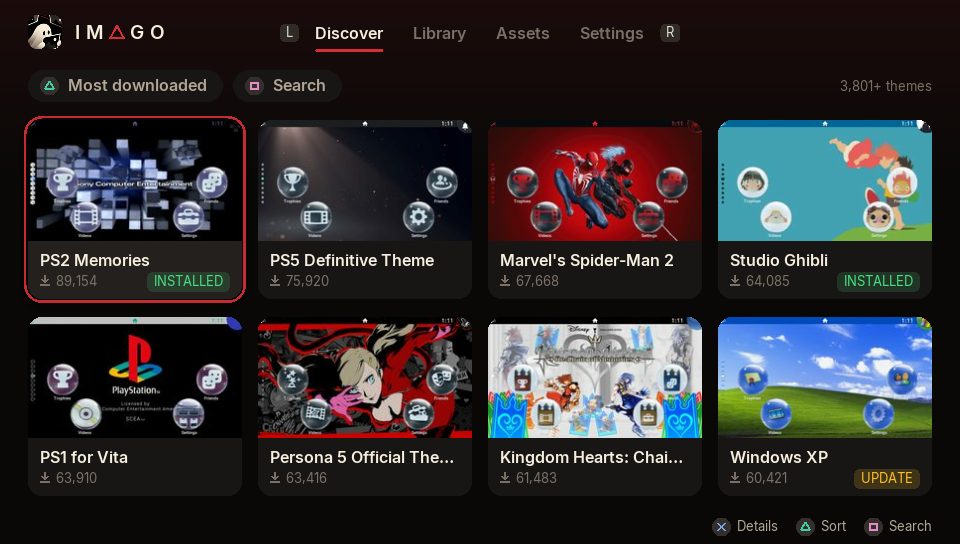
Browse, install and customize Vita themes, then restyle app bubbles and LiveArea artwork.
- Compatibility
- HENkaku / h-encore / Ensō Vita. Author has not tried PS TV.
- Before installing
- Enable unsafe homebrew for database writes; internet for browsing the theme repository.
- Game data
- Theme downloads selected inside the app
Setup & storage paths
- Install imago-v1.3.0.vpk using VitaShell and enable unsafe homebrew in HENkaku Settings.
- Browse psvt.ovh through Imago, install a theme, then apply it in Settings → Theme & Background → Theme.
- Keep the automatic database and original-artwork backups. Local themes need a folder such as ux0:customtheme/YourTheme/theme.xml.
ux0:customtheme/ux0:data/Imago/ur0:shell/db/app.db
File details & SHA-256 · 1 file
imago-v1.3.0.vpk1.3.0 · 3,736,541 bytes
73167cc9cc1837181d0e586225d65305a5f49d29f4dede2dac2ba78a02fc0bc5Official source file Icon: Sevy · original package icon
Screenshot: Sevy · official Imago emulator screenshot (MIT project)
Red Squirrel's established tool for online and local themes, with database backup and restore.
- Compatibility
- Author specifies HENkaku / h-encore. No exact firmware range or model matrix published.
- Before installing
- Unsafe homebrew permission is required to install or remove themes in the system database.
- Game data
- Theme downloads selected inside the app
Setup & storage paths
- Install CTManager_v4.02.vpk with VitaShell; enable unsafe homebrew and restart as the author instructs.
- Create a database backup before editing themes. Browse the online repository or import an extracted local theme folder.
- Apply the installed theme in Settings → Theme & Background → Theme. Version 4.02 fixes the cache/database-backup menu crash.
ux0:customtheme/ur0:shell/db/app.db
File details & SHA-256 · 1 file
CTManager_v4.02.vpk4.02 · 3,114,645 bytes
469fca4a12c7bef3d72f7b3a38b66318c271550d8bfaa9c5da3689409c013c91Official source file Icon: Red Squirrel · original package icon
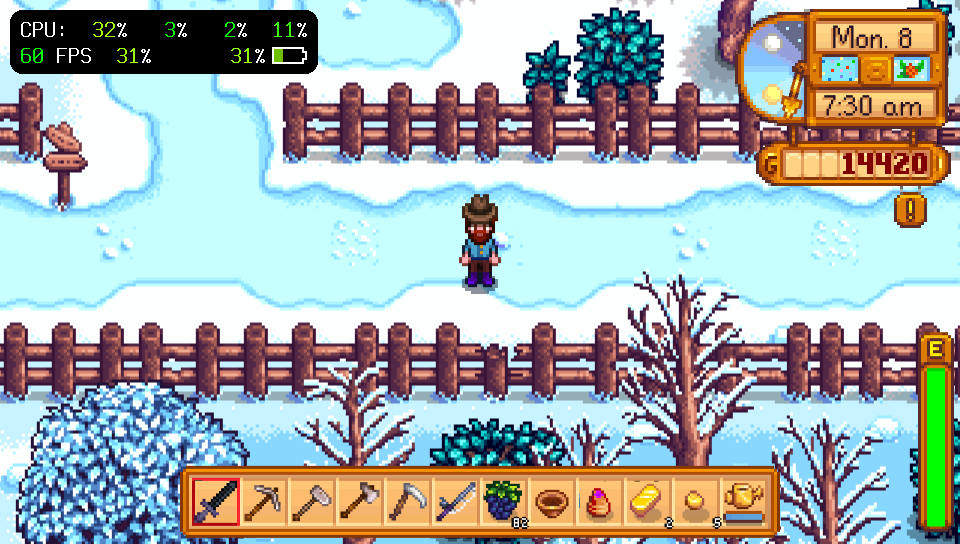
An on-screen CPU, GPU, memory and FPS monitor with optional per-app clock profiles.
- Compatibility
- Stable 1.1 · author supports firmware 3.60 and 3.65 only. Newer 1.2beta is a separate pre-release.
- Before installing
- taiHEN on supported firmware. Use one active tai config and preserve its existing entries.
- Game data
- No game data required
Setup & storage paths
- Copy PSVshell.skprx to ur0:tai/. In your active tai configuration, add ur0:tai/PSVshell.skprx beneath *KERNEL.
- Restart the Vita. SELECT + UP or SELECT + DOWN cycles the display modes.
- Leave clock settings at Default for monitoring. Manual frequencies and per-game/global profiles are optional; this page makes no measured performance claim.
ur0:tai/PSVshell.skprxur0:tai/config.txt
File details & SHA-256 · 1 file
PSVshell.skprx1.1 stable · 32,732 bytes
032b77c2863f93895343b23132e325c12299d478a6e7a3417a114722f034c63eOfficial source file Project by Electry.
Screenshot: Electry · official PSVshell HUD screenshot

Adds a numeric battery percentage to the Vita's system status bar.
- Compatibility
- Handheld Vita. r10 source lists retail 3.55 / 3.60 / 3.65 / 3.67 / 3.68 shells; no 3.69+ claim.
- Before installing
- taiHEN; battery display has no useful function on PS TV. Firmware identification is not a jailbreak support claim.
- Game data
- No game data required
Setup & storage paths
- Put shellbat.suprx in your active tai folder. This page uses ur0:tai/; the author's example uses ux0:tai/.
- Add ur0:tai/shellbat.suprx beneath *main in ur0:tai/config.txt, adapting both paths consistently if your active configuration is ux0:tai/config.txt.
- Restart and check the status bar. Do not infer support for newer firmware from the r10 label.
ur0:tai/shellbat.suprxur0:tai/config.txt
File details & SHA-256 · 1 file
shellbat.suprxr10 · 3,014 bytes
d169ca70683795dd7257998f55c8b922b664343bf1d45bc0cf146a94bccb38ecOfficial source file Project by nowrep.
Screenshot: nowrep · official shellbat screenshot (MIT repository)
Connect DS3, DS4 or DualSense controllers to the Vita, with up to two controllers supported.
- Compatibility
- Vita taiHEN plugin; author provides no numeric firmware range. Controller pairing limitations are documented.
- Before installing
- A supported Bluetooth controller and taiHEN. Remove conflicting controller plugins according to the author's notes.
- Game data
- No game data required
Setup & storage paths
- Copy ds34vita.skprx to ur0:tai/ and add its path beneath *KERNEL in the active tai config.
- If using reVita, put ds34vita after reVita. Restart and follow the author's controller-specific Bluetooth pairing procedure.
- DS4 pairs with SHARE + PS and DualSense with CREATE + PS. DS3 requires its host Bluetooth address to be set by the pairing procedure; vibration is not supported.
ur0:tai/ds34vita.skprxur0:tai/config.txt
File details & SHA-256 · 1 file
ds34vita.skprx1.1 · 12,618 bytes
5212c4460d105d417829419df8ef5abc803ff13b1332f991263e6ea4ee412fb6Official source file Project by MERLev / xerpi / TheFloW.
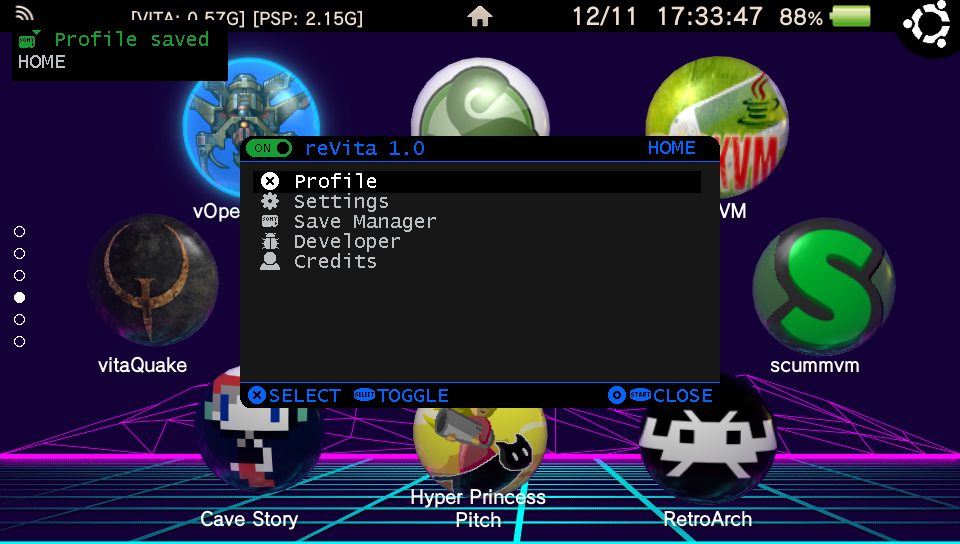
Remap buttons, touch and sticks, set turbo actions and save profiles for native games and Adrenaline.
- Compatibility
- Vita / PS TV on 3.60 or 3.65 only. Adrenaline menu needs a graphics filter other than Original.
- Before installing
- taiHEN and the required ioplus.skprx below. Optional reVitaMotion.suprx adds gyro support.
- Game data
- No game data required
Setup & storage paths
- Copy ioplus.skprx and reVita.skprx to ur0:tai/. Add both paths beneath *KERNEL in the active tai config: ioplus first, reVita second, then ds34vita if present.
- Restart. START + SQUARE opens the remapping menu; profiles and HOTKEYS.ini are stored in ux0:data/reVita/.
- For optional gyro setup, copy reVitaMotion.suprx to ur0:tai/ and follow the author's SceShell/main section configuration instructions.
ur0:tai/reVita.skprxur0:tai/ioplus.skprxux0:data/reVita/
File details & SHA-256 · 3 files
reVita.skprx1.0.8 · 86,609 bytes
64a6dc604bd251a25fc0ce15e3a30e7422f3987191aac5c16174a5e00df28e09Official source file ioplus.skprx1.0 · 1,849 bytes
a3b149ef17407483db1ee2419c9ca186550b16614c7f3a1c1343cafe8728fdadOfficial source file reVitaMotion.suprx1.0.8 · 5,878 bytes
d6242a39b88434c22e8ba14a3e245f7e5a80970b1175b2fcf4eaa1371e92a6efOfficial source file Project by MERLev.
Screenshot: MERLev · official reVita menu screenshot
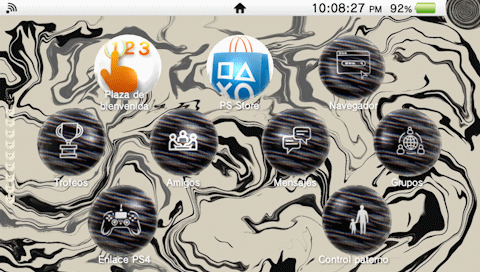
A cream and black abstract theme with warped patterns and an optical illusion skull lock screen, created by Alberto Munguia.
- Compatibility
- Custom themes on a homebrew-enabled Vita. No exact firmware range or PS TV claim published by this author.
- Before installing
- Imago or Custom Themes Manager with unsafe homebrew enabled. This ZIP contains theme assets, not an installable VPK.
- Game data
- Complete theme assets supplied
Setup & storage paths
- Create a new MINIMAL folder beneath ux0:customtheme/. Extract this ZIP into that folder; theme.xml must be directly at ux0:customtheme/MINIMAL/theme.xml. The upstream ZIP has its files at archive root.
- In Imago, add the local theme folder to your Library, or use Custom Themes Manager’s local-folder install option. Keep the existing theme database backup.
- Apply MINIMAL in Settings → Theme & Background → Theme. Author and version are verified from the original theme.xml.
ux0:customtheme/MINIMAL/theme.xml
File details & SHA-256 · 1 file
MINIMAL-v01.00.zip01.00 · 7,051,543 bytes
05625c766d9dc5f767ff1c3cbf8f078d8e9b519599fae77e9abd4bd31f43168fOfficial source file Project by Alberto Munguia.
Screenshot: Alberto Munguia · MINIMAL original packaged dashboard preview; image rights remain with author