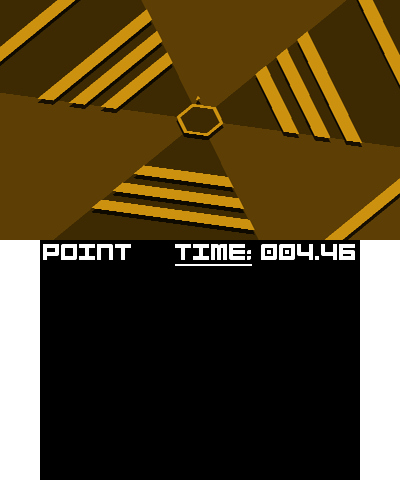
Super-Haxagon
3.9.1homebrewgamearcade
A complete homebrew arcade game inspired by Super Hexagon: dodge rotating walls and survive.
Setup: Extract the 3DS package and use its SuperHaxagon.3dsx in /3ds or install SuperHaxagon.cia. Assets are bundled; no commercial game files or BIOS are needed. Use the included README for 3DS controls.
Files, versions & SHA-256
- SuperHaxagon-3DS-armhf.3dsx.zip
- 3.9.1 · 20,934,515 bytes · 19.96 MiB
- SHA-256
056e3e5224bd20aaadac4ed0300575d8807a7c689bc19261438ca9bac17a114e- Original source
- Publisher file
- Bundle contents
- README.md, SuperHaxagon.3dsx, licenses\CREDITS.md, licenses\LICENSE.libs.md, licenses\LICENSE.md, v3.9.1.txt
- SuperHaxagon.3dsx
- 3.9.1 · 23,054,768 bytes · 21.99 MiB
- SHA-256
998b3853f331d84d980d9c8f5121243bf7542cd52c5ee25243df292d659e4501- Original source
- Publisher file
- SuperHaxagon-3DS-armhf.cia.zip
- 3.9.1 · 21,669,131 bytes · 20.67 MiB
- SHA-256
2eeefec5642f5ce4507121a6aa0826611e9af7a5da755a2f084786b19a12865c- Original source
- Publisher file
- Bundle contents
- README.md, SuperHaxagon.cia, licenses\CREDITS.md, licenses\LICENSE.libs.md, licenses\LICENSE.md, v3.9.1.txt
- SuperHaxagon.cia
- 3.9.1 · 23,479,232 bytes · 22.39 MiB
- SHA-256
22433a27ea1e69b4ef45ad3dcc94629af84e552d14058a0d41e7e02113966cdd- Original source
- Publisher file
prboom3ds
v0.7-alphaportdoomfpsdata-required
Doom engine port for 3DS with stereoscopic view controls.
Setup: Prerelease v0.7-alpha. Place prboom.wad plus a legally obtained Doom IWAD (for example doom.wad or doom2.wad) in /3ds/prboom3ds/. The engine download does not include commercial Doom game data; optional PWADs still need their matching IWAD.
Files, versions & SHA-256
- prboom3ds.3dsx
- v0.7-alpha · 955,168 bytes · 932.8 KiB
- SHA-256
931bb26a1ab1ed3cf85e66d624492f6f39a841ea07e9efdec0b7f0ae101cf58e- Original source
- Publisher file
- Bundle contents
- prboom3ds.cia
- v0.7-alpha · 1,007,040 bytes · 983.4 KiB
- SHA-256
3eb2640c874ac1f413bfdec3fd6bd94ae9763bc8c3535b386c7f71772e3960e6- Original source
- Publisher file
- Bundle contents
- prboom3ds.smdh
- v0.7-alpha · 14,016 bytes · 13.7 KiB
- SHA-256
d4ad16c6479130ac956bcdac66e97e27af318b9fc1fa63078c07b6165106daa0- Original source
- Publisher file
- Bundle contents
- prboom.wad
- v0.7-alpha · 283,028 bytes · 276.4 KiB
- SHA-256
6fd0504745937988e6230a71b56317fc1328ecd5b14ce8e639112151f2a5b43c- Original source
- Publisher file
- Bundle contents
ctrQuake
v0.8portquakefpssharewarenew3dsold3ds
Native 3DS port of Quake with the shareware episode, configurable touch controls and network multiplayer.
Setup: Extract the entire ctrQuake.zip to the SD root to retain its runtime folders and shareware game data, then launch the included 3DSX from Homebrew Launcher or install the separate CIA. The full game requires pak1.pak from your own Quake copy in the ctrQuake/id1 folder. Original-model controls use ABXY to look; the C-Stick camera is New 3DS only. Most multiplayer servers require the full game. No BIOS is required.
Files, versions & SHA-256
- ctrQuake.zip
- v0.8 · 8,921,677 bytes · 8.51 MiB
- SHA-256
751ed1935d023371effe7777a2456ad9cc8565b4cf03480d9f4c93c2b0c0cbae- Original source
- Publisher file
- Bundle contents
- 3ds\ctrQuake\ctrQuake.smdh, 3ds\ctrQuake\id1\pak0.pak, 3ds\ctrQuake\keyboardOverlay.bin, 3ds\ctrQuake\touchOverlay.bin, 3ds\ctrQuake\ctrQuake.3dsx
- ctrQuake.3dsx
- v0.8 · 628,224 bytes · 613.5 KiB
- SHA-256
bda4123657eae8fedb2fdc4447df56d80c68b21cac6d9263400ec0248e582a92- Original source
- Publisher file
- ctrQuake.cia
- v0.8 · 984,000 bytes · 960.9 KiB
- SHA-256
a7f37df235c0b63738959bdf66a65f113c61193908f806c7125a007ae2ce7786- Original source
- Publisher file
- Bundle contents
2048 - 3DS Port
v1.1.1puzzle2048standalone
A standalone sliding-tile puzzle game with an on-console leaderboard.
Setup: Copy the 3DSX into /3ds/ and use Homebrew Launcher. No commercial game data or BIOS is required.
Files, versions & SHA-256
- 2048-port-3ds.3dsx
- v1.1.1 · 136,500 bytes · 133.3 KiB
- SHA-256
fba1c58729e08699bb364be77055077dd28b832f5c971036e1609cc500f6dfc0- Original source
- Publisher file
- Bundle contents
Minicraft3DS
2.1.0craftingsurvivalstandalone
A native 3DS port of the small crafting and survival game Minicraft.
Setup: Use the published 3DSX through Homebrew Launcher. This is Minicraft homebrew, separate from commercial Minecraft: New Nintendo 3DS Edition. No Minecraft installation or BIOS is required.
Files, versions & SHA-256
- Minicraft3DS.3dsx
- 2.1.0 · 5,030,804 bytes · 4.80 MiB
- SHA-256
aafe57e3b3ca2a6e4a56140464b736d9dc93101fd3204b62ea5cc13cb3c1e8e4- Original source
- Publisher file
- Bundle contents
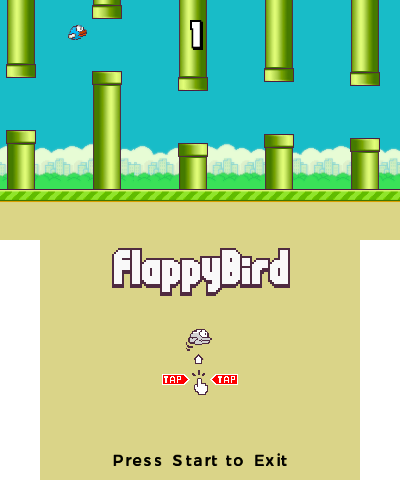
Flappy-Bird
1.4.2arcadestandaloneCIA3DSX
A compact homebrew arcade game: guide the bird through gaps and beat your score.
Setup: Install the CIA on CFW or launch the 3DSX from /3ds/. This standalone homebrew release does not require a commercial game installation or BIOS.
Files, versions & SHA-256
- Flappy-Bird.3dsx
- 1.4.2 · 1,733,436 bytes · 1.65 MiB
- SHA-256
d717a8d4b51a2c5444b25f6980c3cf7b9d92131dbff8ef2df4e76cf1cde6c630- Original source
- Publisher file
- Bundle contents
- Flappy-Bird.cia
- 1.4.2 · 1,659,840 bytes · 1.58 MiB
- SHA-256
2525b8e5ae76f590d4c4095e2633654bfc61e0deffeca37194d18ceb5bd2877a- Original source
- Publisher file
- Bundle contents
Snakes
0.2.5snakelocal multiplayerarcade
A homebrew snake game with local wireless multiplayer.
Setup: Install the CIA on CFW or use its 3DSX in Homebrew Launcher. Check the project controls and local-play instructions; multiplayer requires compatible nearby systems and wireless. No commercial game data or BIOS is supplied or required. The publisher labels this release beta.
Files, versions & SHA-256
- snakes.3dsx
- 0.2.5 · 327,356 bytes · 319.7 KiB
- SHA-256
dc1c4eba87a1a049c8264b67ddc6fd15c1932299a06a40a5ca04b139c64045a1- Original source
- Publisher file
- Bundle contents
- snakes.cia
- 0.2.5 · 781,248 bytes · 762.9 KiB
- SHA-256
2be37716115c061ee6bdba2e256e0403ef5a9a287663a95a8e1781ddc98c0aec- Original source
- Publisher file
- Bundle contents
