
PS5upload
Transfer and manage homebrew from a computer, phone or browser. Follow its console-service setup instructions.
 whatwhatboy
Transfer and manage PS5 files with PS5upload, ezRemote Client, FTP and websrv. Start with working homebrew access and the service required by your chosen tool.
Choose a file client or the console service it needs. Match the tool’s release to your firmware and loader.
Transfer and manage homebrew from a computer, phone or browser. Follow its console-service setup instructions.
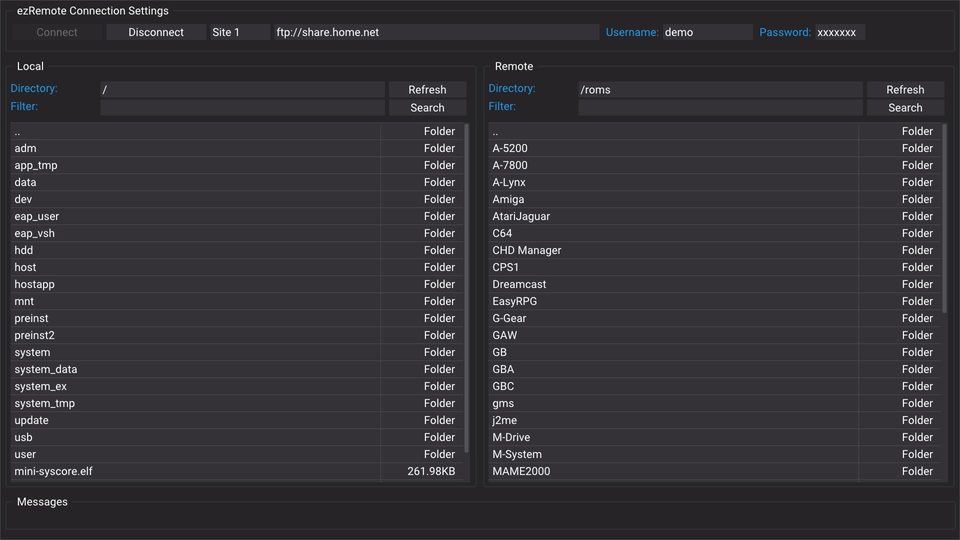
Manage PS5 files and transfers with the console client. Requires websrv running on the PS5; follow the loader and client installation instructions for this release.
FTP server payload for a jailbroken PS5 with a compatible ELF loader. Connect from an FTP client on your local network to port 2121.
Run the PS5 homebrew web interface, browser-based file access and app launcher on port 8080. Requires an existing compatible ELF loader.
Console Downloads uses /data/whatwhatboy for internal storage, or a whatwhatboy folder on an actual detected USB/external mount. Choose Prepare download folder, then explicitly create or verify it through the running ezRemote Client on port 9090. Return to the downloader on background-server port 6701 before saving a file.
PS5 websrv on port 8080 supplies destination checks, mounted-storage detection and a read-only filesystem browser. Folder creation and reviewed-archive extraction use the separate client page on port 9090. Each extraction needs its own action and a new output folder; opening a page never extracts or runs a file.