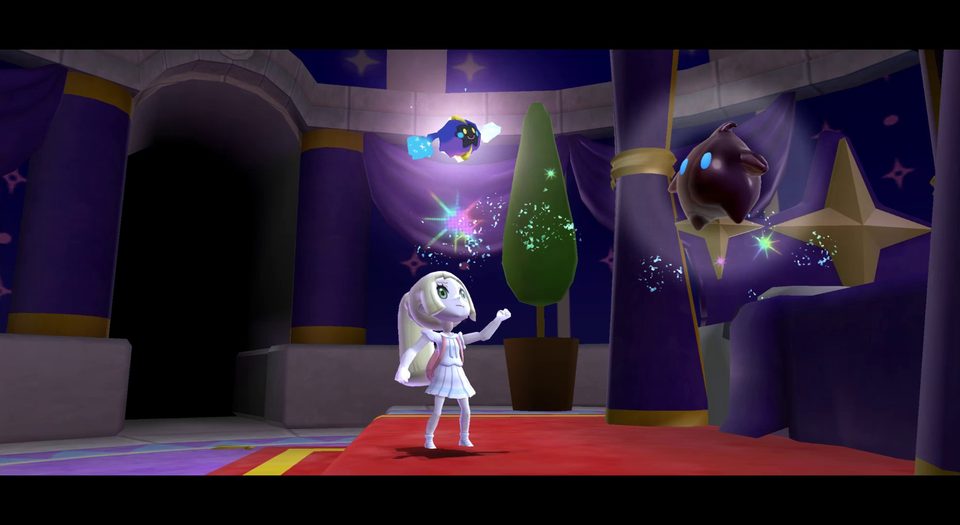
Daredevil Mode changes the original Galaxy challenge rules. Super Lillie Galaxy replaces characters and adds visual, dialogue and music changes; its creator recommends Dolphin because Toy Time Galaxy can lag substantially on Wii.
Offline adventures: these mods do not add network multiplayer.
Riivolution · step by step
Match the original gameGalaxy uses RMG; Galaxy 2 uses SB4. Use the region supported by the selected patch. A Galaxy 2 mod does not patch the first game.
Prepare Homebrew Channel and RiivolutionUse your model’s maintained homebrew guide. Extract the Riivolution ZIP so /apps/riivolution/boot.elf is on FAT32 SD. These patches use an original disc.
Extract the complete modUse a PC/phone archive tool for ZIP or 7z. Copy the mod’s data folder and its riivolution folder to SD root, preserving names. Keep an independent backup before copying files.
Choose saves before launchBack up the game save first. For Daredevil, choose With SD save to keep the mod’s redirected save separate; With Wii save uses the console save. New Green Stars deliberately replaces progress with a 120-star start.
Launch one overhaulInsert the matching game disc, launch Riivolution from Homebrew Channel, enable the selected mod and disable other overhauls. Select the mod’s supported language and save options, then Launch.
Compatibility. The supplied XMLs select RMG with E (North America) or P (PAL). No J/K selector is supplied in this package. These files are for Galaxy 1.
Storage and launch. Copy /smg1daredevil and /riivolution to SD root. Start Riivolution with the matching disc, enable SMG1D Core and choose With SD save for a redirected mod save or With Wii save to use the console save. Back up the original first.
Keep these top-level paths:riivolution, smg1daredevil
Disc selectors from the supplied XML (unmodified attributes):
riivolution/smg1daredevil_E.xml
Disc selector: game RMG. Regions: North America (E).
The XML selector does not pin a disc revision here; follow the mod’s own compatibility checks.
riivolution/smg1daredevil_P.xml
Disc selector: game RMG. Regions: PAL (P).
The XML selector does not pin a disc revision here; follow the mod’s own compatibility checks.
Unpacked size: 1.07 MiB. Leave additional room for saves and updates.
Original package preserved and hash-verified in the local archive. The download above uses the verified site copy.
Camyoshi · creator screenshot
Super Lillie Galaxy
4.4.0Super Mario Galaxy7z · Riivolution mod data
A character and presentation overhaul starring Lillie, with other Pokémon characters, dialogue, audio and texture changes. Optional cutscene files are separate and are not required or linked here.
Offline mod · creator recommends Dolphin for performance
Requires: Original Super Mario Galaxy; Riivolution on a homebrew Wii for disc setup, SD and a 7z extraction tool on PC/phone.
Compatibility. Creator builds for USA with Japanese/Korean compatibility; PAL support is incomplete, with missing text and a possible Toy Time Galaxy crash despite P appearing in the XML. USA was console-tested by the creator; other regions were Dolphin-tested. Significant Toy Time lag is reported on Wii.
Storage and launch. Extract the 7z. Copy /Lillie1 to SD root and Super Lillie Galaxy.xml into /riivolution, then enable it in Riivolution with the matching disc. Keep the supplied XML and current 4.4.0 data together; optional cutscenes are a separate archive. Keep an original save backup; this patch has no save-redirection option.
Keep these top-level paths:Lillie1, README.txt, riivolution
Disc selectors from the supplied XML (unmodified attributes):
riivolution/Super Lillie Galaxy.xml
Disc selector: game RMG. Regions: North America (E) · Japan (J) · PAL (P) · Korea (K).
The XML selector does not pin a disc revision here; follow the mod’s own compatibility checks.
Unpacked size: 54.10 MiB. Leave additional room for saves and updates.
Apply custom levels, textures, music and other patches to retail Wii discs at launch.
Depends on the selected mod
Requires: Homebrew Channel on Wii or vWii, your retail disc, and matching mod XML/data. The project documents an updated IOS37 on original Wii; use model-specific instructions for vWii rather than a stock-Wii IOS installer.
Compatibility. Standard v1.06 is for Wii and vWii. The Wii Mini build is listed separately.
Storage and launch. Copy apps/riivolution to the storage root. Mod XML files normally go in /riivolution; keep mod data at the paths specified inside that XML. Start Riivolution, select the intended patch and launch the disc. Installing a System Menu shortcut is optional.