Nintendo DS & DSi · Apps & launch tools

Core launchers and 8 native utilities, music, ebook and camera apps, with ready files and model-specific prerequisites.

Apps & launch tools

12 resources shown

30 native apps, games and emulators, plus 15 ready TWiLight skins. The four original setup tools stay below. Downloads show their actual format, exact published version and file hashes.

DS / DSi apps & homebrew tools

ftpd project banner

ftpd · Nintendo DS build

3.2.1NDSFTPWireless transfers

Transfer files over a local wireless network using an FTP client. Launch the NDS build through your compatible DS homebrew setup and connect to the address it displays.

Native apps & utilities

Homebrew Menu · hbmenu original DS menu icon

Homebrew Menu · hbmenu

  • v0.11.0
  • ZIP → NDS

devkitPro’s file browser and launcher for native DS homebrew.

Hardware: DS / DS Lite flashcart · DSi via supported homebrew route

Setup & prerequisites
  1. Extract the release and use BOOT.NDS with the bootstrap appropriate to your flashcart or existing homebrew route.
  2. Place additional homebrew in /nds/ and keep required app data in the paths its publisher specifies. Read the release README before choosing a flashcart boot file.

This is a launcher for an already supported entry point, not a DSi exploit or a 3DS CIA installer. Bootstrap selection depends on the flashcart.

The original ready bundle also includes bootstrap.cia for a separate 3DS route. On DS/DSi use BOOT.NDS and the relevant flashcart bootstrap; do not install the CIA.

Files, sizes & SHA-256
hbmenu-0.11.0.zip
v0.11.0 · 1,639,323 bytes · ZIP → NDS
SHA-256
8e1bd3eabb766383728847d1a66a7551c207102ce86d2c9b20cc98402b47ebc2
Original ready file
Publisher download
Native executables checked
hbmenu/akmenu4.nds, hbmenu/BOOT.NDS, hbmenu/nds/argvTest.nds, hbmenu/nds/dslink.nds, hbmenu/nds/ftpd.nds, hbmenu/_BOOT_MP.NDS

devkitPro · original BOOT.NDS menu icon from the hbmenu ready release

CG NDS Input Test original DS menu icon

CG NDS Input Test

  • 1.0.0
  • NDS

A native diagnostic for buttons, touchscreen, microphone and battery status.

Hardware: DS / DS Lite flashcart · DSi / XL · 3DS DS mode

Setup & prerequisites
  1. Copy cg-input-test.nds to your flashcart microSD or prepared console SD, then launch it as native NDS homebrew.
  2. No separate data folder is required. /roms/nds/homebrew/ is an optional organizational folder.

Battery information depends on hardware and launch mode; original DS hardware only exposes a high/low battery state.

Files, sizes & SHA-256
cg-input-test.nds
1.0.0 · 312,320 bytes · NDS
SHA-256
f5893193d81138aed6354bd802288cea3d2a1b38e503f149d4906d464c470454
Original ready file
Publisher download
Native executables checked
cg-input-test.nds

CG NDS Input Test authors · original packaged Nintendo DS banner icon

Cereal Box Snow original DS menu icon

Cereal Box Snow

  • v1.2.0
  • NDS

A creative particle simulator with snow, fire, rain, birds and fireflies.

Hardware: Nintendo DS homebrew

Setup & prerequisites
  1. Copy CerealBoxSnowNds1.2.0.nds to your homebrew storage, for example /roms/nds/homebrew/, then open it in a compatible homebrew launcher. This folder is a library suggestion, not a fixed app requirement.
  2. Use the touchscreen and on-screen controls. In the NDS build, X or Up switches between attracting and pushing particles.

Select this Nintendo DS executable. The Windows and Linux releases are separate desktop apps and are not included in the console download.

Files, sizes & SHA-256
CerealBoxSnowNds1.2.0.nds
v1.2.0 · 465,920 bytes · NDS
SHA-256
17de6ca80a8947947d06fb7f78fe5ca389108019aff479f4d99bb148c8c7b5d4
Original ready file
Publisher download
Native executables checked
CerealBoxSnowNds1.2.0.nds

Cereal Box Snow authors · original packaged Nintendo DS banner icon

NitrousTracker · music studio original DS menu icon

NitrousTracker · music studio

  • release/0.6.5
  • ZIP → NDS

A stylus-operated XM music tracker and sampler, with pattern editing and microphone recording.

Hardware: DS / DS Lite flashcart · DSi via compatible homebrew launcher

Setup & prerequisites
  1. Extract the ready ZIP. Copy nitroustracker.nds and the supplied songs/ and themes/ folders to your SD card. Launch nitroustracker.nds; debug and MIDI variants remain preserved in the original ZIP.
  2. Use the app’s file browser to load or save .xm songs and .wav samples in folders of your choice. Keep copies of your songs before upgrading the app.

This pins the ready 0.6.5 GitHub release. Later builds, including native 3DS and beta releases, have separate packages; they are not substituted for this DS build.

Samples must be uncompressed 8-bit or 16-bit WAV. Memory available for samples is smaller in DS mode than in DSi mode.

Files, sizes & SHA-256
NitrousTracker-0.6.5.zip
release/0.6.5 · 2,499,709 bytes · ZIP → NDS
SHA-256
a9f8a3efc2eaa7dbe9187115f19e30d1648a17d551285d5fb6b2dfe5c14e731c
Original ready file
Publisher download
Native executables checked
nitroustracker.debug.nds, nitroustracker.midi.nds, nitroustracker.nds

NitrousTracker · music studio authors · original packaged Nintendo DS banner icon

dsidl · DSi QR downloader original DS menu icon

dsidl · DSi QR downloader

  • v0.1.1
  • DSi

A DSi-camera utility for downloading a file from a URL encoded in a QR code.

Hardware: DSi / DSi XL · DSi mode only

Setup & prerequisites
  1. Copy dsidl.dsi to the DSi SD card and open it with a DSi-mode homebrew launcher. A DS / DS Lite flashcart cannot provide its required camera and DSi Wi-Fi functions.
  2. Configure Wi-Fi through System Settings → Advanced Settings. Scan a QR containing a URL, then choose the SD destination folder and filename in dsidl.

The publisher labels v0.1.1 as a prerelease. Requires a working DSi camera, SD access and a compatible router. Its dsiwifi library has router limitations; the author says WEP/open networks may not work. Hold SELECT at launch for connection logs.

Files, sizes & SHA-256
dsidl.dsi
v0.1.1 · 1,217,472 bytes · DSi
SHA-256
23f56f0c6b9d0780f6b8306b25879c0ae2c1cc87fbb020d0fa4a1cd1897db30b
Original ready file
Publisher download
Native executables checked
dsidl.dsi

dsidl · DSi QR downloader authors · original packaged Nintendo DS banner icon
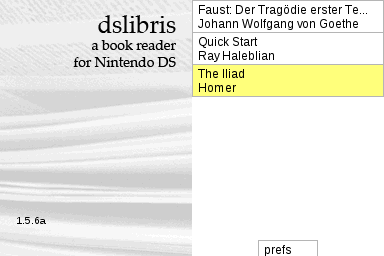
dslibris · EPUB reader official project artwork

dslibris · EPUB reader

  • v1.5.2-2
  • ZIP → NDS

A two-screen ebook reader for DS, DSi and DSi XL, with bookmarks and configurable TrueType fonts.

Hardware: DS / DS Lite flashcart · DSi / DSi XL

Setup & prerequisites
  1. Extract dslibris.nds, Font/ and Book/ to the storage root, keeping that exact layout. Do not put them inside a new app subfolder.
  2. Place your EPUB books in /Book/ and optional .ttf fonts in /Font/. Launch dslibris.nds from the homebrew menu.

Some flashcarts need the matching DLDI patch. This is the published v1.5.2-2 release; the separate v1.6.0 prerelease is not substituted. The upstream repository is archived.

Files, sizes & SHA-256
dslibris-1.5.2-2.zip
v1.5.2-2 · 1,242,044 bytes · ZIP → NDS
SHA-256
95e24563fb93736e65f3d0f45ba22d704e5b93054572196f6a8f58eef2a63a17
Original ready file
Publisher download
Native executables checked
dslibris.nds

Ray Haleblian · official dslibris book-browser screenshot

DSi camera test original DS menu icon

DSi camera test

  • v1.1.0
  • NDS

A small camera utility that previews the DSi’s cameras and saves 640×480 PNG photos.

Hardware: DSi / DSi XL · DSi mode only

Setup & prerequisites
  1. Copy dsi-camera.nds onto the DSi SD card and open it with a launcher that provides DSi-mode camera and SD access.
  2. Saved photos use /DCIM/100DSI00/IMG_####.PNG. Keep existing photos and available space on the card.

The .nds extension does not make this a DS / DS Lite camera app: it requires the DSi hardware cameras. The publisher supplies a separate CIA asset for another installation route; it is not included here.

Files, sizes & SHA-256
dsi-camera.nds
v1.1.0 · 287,744 bytes · NDS
SHA-256
dcce9b1c537f0fbfdb09a97c5992f2a6d75a6137c3787cebf21987a79aea828a
Original ready file
Publisher download
Native executables checked
dsi-camera.nds

DSi camera test authors · original packaged Nintendo DS banner icon

IkuReader · modern build original DS menu icon

IkuReader · modern build

  • 6.5_modern
  • ZIP → required reader data
  • NDS
  • DSi

An updated ebook reader for EPUB, FB2 and text books, with fonts, encodings and bookmarks.

Hardware: DS / DS Lite flashcart · DSi / XL direct boot or hiyaCFW

Setup & prerequisites
  1. Extract sdcard-root.zip into the SD root, retaining /books/ and /data/ikureader/ with its fonts, encodings and translations.
  2. Use IkuReader.nds for DS flashcarts, or IkuReader.dsi for the publisher’s DSi direct-boot/hiyaCFW route. Keep your books and /data/ikureader/bookmarks/ when updating.

The data ZIP is required alongside the selected executable. Preserve the supplied fonts and encoding tables; this page keeps both original console variants separately.

Files, sizes & SHA-256
sdcard-root.zip
6.5_modern · 379,282 bytes · ZIP → required reader data
SHA-256
95a01f2872e4c0c3e2b52bf15184a4b55c51e90a4dbc30a577a6c5cec829a803
Original ready file
Publisher download
IkuReader.nds
6.5_modern · 967,168 bytes · NDS
SHA-256
63c2febdb96db89343373291a5f96111248e5b0afe6f6f7cffb2e5624858c3d0
Original ready file
Publisher download
Native executables checked
IkuReader.nds
IkuReader.dsi
6.5_modern · 967,168 bytes · DSi
SHA-256
d7b0627e240b3e23461efdd6f0eb2a746594717a9017172e0f7805b6deb5800c
Original ready file
Publisher download
Native executables checked
IkuReader.dsi

IkuReader · modern build authors · original packaged Nintendo DS banner icon

Prepare and launch DS homebrew

  1. Choose the right packageA DS / DS Lite uses the Flashcard TWiLight package with a compatible flashcart. A DSi SD-card setup uses the DSi package and its documented entry point.
  2. Keep the supplied folder layoutExtract the package and follow the matching installation page. For the Flashcard package, its _nds folder, roms folder and documented boot NDS file go at the flashcart microSD root.
  3. Use the correct app formatOpen the NDS or DSi build through the launcher specified by the project. GodMode9i’s cartridge functions have additional model-specific access requirements.
  4. Keep a backup before changesCopy your existing saves and SD files before replacing a setup. On DSi, follow the NAND-backup instructions before choosing whether to install Unlaunch.