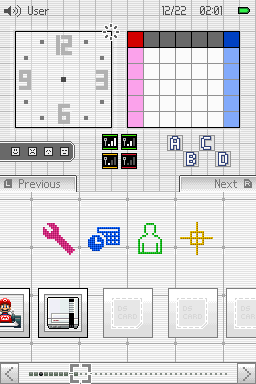
Switch - Basic Light
A Nintendo Switch-inspired custom theme for TWiLight Menu++’s DSi interface.
Hardware: DS / DS Lite flashcart · DSi / XL · 3DS DS-mode launcher
Setup & prerequisites
- Extract the theme directory into /_nds/TWiLightMenu/dsimenu/themes/ on the storage used by TWiLight Menu++.
- Hold SELECT while starting TWiLight Menu++, choose the DSi interface in GUI Settings, select the custom theme and press B to apply.
Requires a working TWiLight Menu++ installation. “DSi” describes the menu interface, not an exclusive console model. Preserve any existing themes when copying.
Files, sizes & SHA-256
- Switch - Basic Light.7z
- v1.1.2 · 8,289 bytes · 7z → theme
- SHA-256
7c0b623d8e8c64a8fb7a664750e03f21be9d12eaa59bee590ef113c2646dd22e- Original ready file
- Publisher download
Switch - Basic Light preview · Pk11 / DS-Homebrew skins
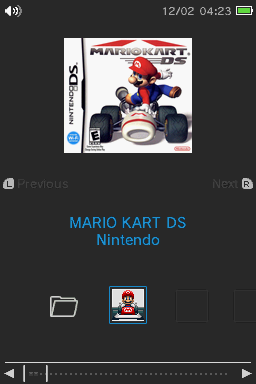
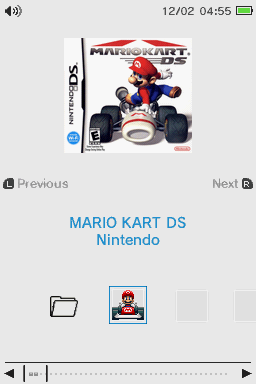
Switch - Basic Dark
A Nintendo Switch-inspired custom theme for TWiLight Menu++’s DSi interface.
Hardware: DS / DS Lite flashcart · DSi / XL · 3DS DS-mode launcher
Setup & prerequisites
- Extract the theme directory into /_nds/TWiLightMenu/dsimenu/themes/ on the storage used by TWiLight Menu++.
- Hold SELECT while starting TWiLight Menu++, choose the DSi interface in GUI Settings, select the custom theme and press B to apply.
Requires a working TWiLight Menu++ installation. “DSi” describes the menu interface, not an exclusive console model. Preserve any existing themes when copying.
Files, sizes & SHA-256
- Switch - Basic Dark.7z
- v1.1.2 · 8,370 bytes · 7z → theme
- SHA-256
9f17e21adb3fc98f69824d1f7bdfcc991cad1527ec63c6dfe878f85f8af82214- Original ready file
- Publisher download
Switch - Basic Dark preview · Pk11 / DS-Homebrew skins
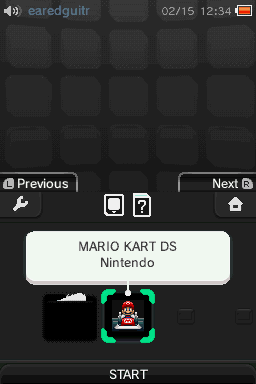
3DarkS
A dark, restrained custom theme for TWiLight Menu++’s 3DS interface.
Hardware: DS / DS Lite flashcart · DSi / XL · 3DS DS-mode launcher
Setup & prerequisites
- Extract the theme directory into /_nds/TWiLightMenu/3dsmenu/themes/ on the storage used by TWiLight Menu++.
- Hold SELECT while starting TWiLight Menu++, choose the 3DS interface in GUI Settings, select the custom theme and press B to apply.
Requires a working TWiLight Menu++ installation. “3DS” describes the menu interface, not an exclusive console model. Preserve any existing themes when copying.
Files, sizes & SHA-256
- 3DarkS.7z
- v1.1.2 · 1,027,123 bytes · 7z → theme
- SHA-256
ebcd15388d73803866c7e8da3e9fbbbe7af16f771d3d6c848383b20ff437cd92- Original ready file
- Publisher download
3DarkS preview · earedguitr, Void / DS-Homebrew skins

Sky
A sky-themed menu designed for the blue DSi profile colour.
Hardware: DS / DS Lite flashcart · DSi / XL · 3DS via TWiLight
Setup & prerequisites
- Extract the ready archive into /_nds/TWiLightMenu/dsimenu/themes/ on the storage used by TWiLight. Retain the skin’s own folder and original directory name.
- Hold SELECT while launching TWiLight Menu++, choose the DSi user interface in GUI Settings, select this Custom Theme and press B to apply.
A working TWiLight Menu++ installation is required. DSi identifies the launcher interface, not a restriction to DSi hardware. Preserve other theme folders when copying.
Files, sizes & SHA-256
- Sky.7z
- v0.7 · 3,299,535 bytes · 7z → theme
- SHA-256
a8560f813515ce6ae0e0ea5b0676330d713286b0f582eedc126454f82710c1bf- Original ready file
- Publisher download
kool_duck · official Sky theme preview via DS-Homebrew
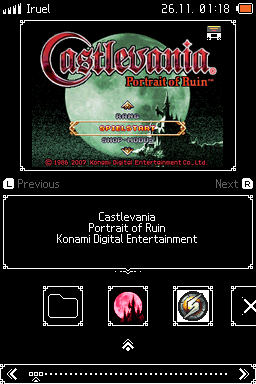
Sharp - White on Black
A monochrome theme with a 208×143 box-art frame and restrained interface details.
Hardware: DS / DS Lite flashcart · DSi / XL · 3DS via TWiLight
Setup & prerequisites
- Extract the ready archive into /_nds/TWiLightMenu/dsimenu/themes/ on the storage used by TWiLight. Retain the skin’s own folder and original directory name.
- Hold SELECT while launching TWiLight Menu++, choose the DSi user interface in GUI Settings, select this Custom Theme and press B to apply.
A working TWiLight Menu++ installation is required. DSi identifies the launcher interface, not a restriction to DSi hardware. Preserve other theme folders when copying.
Files, sizes & SHA-256
- Sharp - White on Black.7z
- v1.0.1 · 18,239 bytes · 7z → theme
- SHA-256
4e4b6b6cf546d5527ce69366e5b4cb39daa7ce05832d6db495a1027f4e3f2d1a- Original ready file
- Publisher download
Iruel · official Sharp - White on Black theme preview via DS-Homebrew
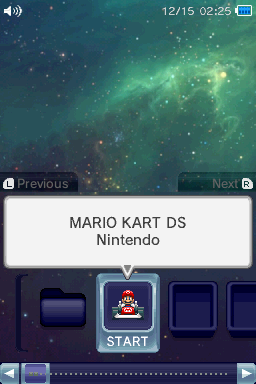
Relaxing Space
A deep-space menu with soothing background music, adapted from an earlier 3DS theme.
Hardware: DS / DS Lite flashcart · DSi / XL · 3DS via TWiLight
Setup & prerequisites
- Extract the ready archive into /_nds/TWiLightMenu/dsimenu/themes/ on the storage used by TWiLight. Retain the skin’s own folder and original directory name.
- Hold SELECT while launching TWiLight Menu++, choose the DSi user interface in GUI Settings, select this Custom Theme and press B to apply.
A working TWiLight Menu++ installation is required. DSi identifies the launcher interface, not a restriction to DSi hardware. Preserve other theme folders when copying.
Files, sizes & SHA-256
- Relaxing Space.7z
- v1.2.1 · 1,461,625 bytes · 7z → theme
- SHA-256
8831545a51211bfbf4be6d3bc1ac407ac2b0a825483eb1f7d6481c3b42a3c0c0- Original ready file
- Publisher download
BlakCake, DVDo · official Relaxing Space theme preview via DS-Homebrew
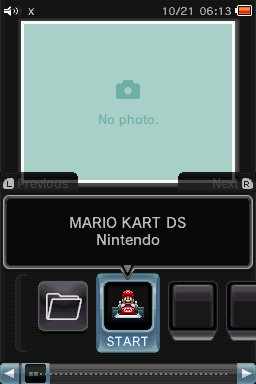
Darker
A darker variation of the default TWiLight DSi interface.
Hardware: DS / DS Lite flashcart · DSi / XL · 3DS via TWiLight
Setup & prerequisites
- Extract the ready archive into /_nds/TWiLightMenu/dsimenu/themes/ on the storage used by TWiLight. Retain the skin’s own folder and original directory name.
- Hold SELECT while launching TWiLight Menu++, choose the DSi user interface in GUI Settings, select this Custom Theme and press B to apply.
A working TWiLight Menu++ installation is required. DSi identifies the launcher interface, not a restriction to DSi hardware. Preserve other theme folders when copying.
Files, sizes & SHA-256
- darker.7z
- v1.0.2 · 17,699 bytes · 7z → theme
- SHA-256
671fc64b035062386e2772a69aa3b71331d3c884a121f923c875f72ad01dcc34- Original ready file
- Publisher download
RocketRobz, spellboundtriangle · official Darker theme preview via DS-Homebrew
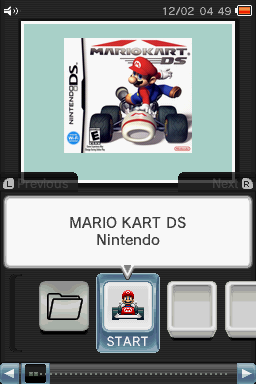
Default Dark
The default TWiLight DSi layout in black, useful for restoring a familiar dark interface.
Hardware: DS / DS Lite flashcart · DSi / XL · 3DS via TWiLight
Setup & prerequisites
- Extract the ready archive into /_nds/TWiLightMenu/dsimenu/themes/ on the storage used by TWiLight. Retain the skin’s own folder and original directory name.
- Hold SELECT while launching TWiLight Menu++, choose the DSi user interface in GUI Settings, select this Custom Theme and press B to apply.
A working TWiLight Menu++ installation is required. DSi identifies the launcher interface, not a restriction to DSi hardware. Preserve other theme folders when copying.
Files, sizes & SHA-256
- dark.7z
- v1.0.4 · 17,111 bytes · 7z → theme
- SHA-256
eaca4b88cfb315be7000b7e937661d89072869a27e0961892367b111491063fd- Original ready file
- Publisher download
RocketRobz · official Default Dark theme preview via DS-Homebrew
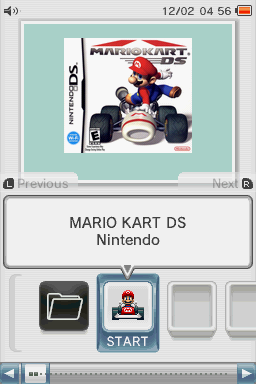
Default White
The default TWiLight DSi layout in white, useful for restoring the familiar light interface.
Hardware: DS / DS Lite flashcart · DSi / XL · 3DS via TWiLight
Setup & prerequisites
- Extract the ready archive into /_nds/TWiLightMenu/dsimenu/themes/ on the storage used by TWiLight. Retain the skin’s own folder and original directory name.
- Hold SELECT while launching TWiLight Menu++, choose the DSi user interface in GUI Settings, select this Custom Theme and press B to apply.
A working TWiLight Menu++ installation is required. DSi identifies the launcher interface, not a restriction to DSi hardware. Preserve other theme folders when copying.
Files, sizes & SHA-256
- white.7z
- v1.0.4 · 17,246 bytes · 7z → theme
- SHA-256
64b7f6f75015f0510fda2387bfee7fedcef5de2f328bb8b4e00a3f0f12167c55- Original ready file
- Publisher download
RocketRobz · official Default White theme preview via DS-Homebrew
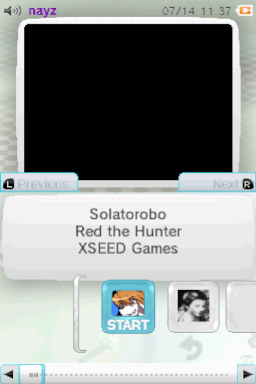
Wii U
A Wii U HOME Menu-inspired TWiLight skin with matching sound and music.
Hardware: DS / DS Lite flashcart · DSi / XL · 3DS via TWiLight
Setup & prerequisites
- Extract the theme’s own directory into /_nds/TWiLightMenu/3dsmenu/themes/ on the storage used by TWiLight Menu++. Retain the original theme directory name.
- Hold SELECT while starting TWiLight, choose the 3DS user interface under GUI Settings, then select this Custom Theme and press B to apply.
Requires a working TWiLight Menu++ installation. “3DS” identifies its interface rather than an exclusive console model. This is launcher artwork and settings; it does not install system firmware.
Files, sizes & SHA-256
- Wii U.7z
- v1.0.0 · 6,061,847 bytes · 7z → theme
- SHA-256
f8026fcbfa6252cb51a0e99f9b29c36df0145588c2e88f7d2c3a4feed49ffd98- Original ready file
- Publisher download
nayz · official Wii U preview via DS-Homebrew

RetroV1
A retro-styled custom skin for the TWiLight 3DS interface.
Hardware: DS / DS Lite flashcart · DSi / XL · 3DS via TWiLight
Setup & prerequisites
- Extract the theme’s own directory into /_nds/TWiLightMenu/3dsmenu/themes/ on the storage used by TWiLight Menu++. Retain the original theme directory name.
- Hold SELECT while starting TWiLight, choose the 3DS user interface under GUI Settings, then select this Custom Theme and press B to apply.
Requires a working TWiLight Menu++ installation. “3DS” identifies its interface rather than an exclusive console model. This is launcher artwork and settings; it does not install system firmware.
Files, sizes & SHA-256
- RetroV1.7z
- v1.0.0 · 6,778,193 bytes · 7z → theme
- SHA-256
4dde1b4d9da89d9c94542ee52cc851e927783908af3f9f63698af19f132ba2a4- Original ready file
- Publisher download
CJ1899 · official RetroV1 preview via DS-Homebrew
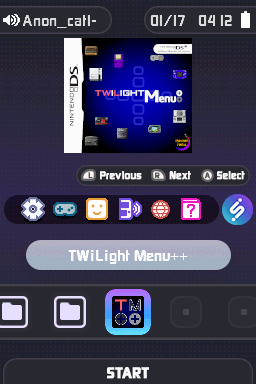
DiiSU Dark
An iiSU-inspired dark menu with custom icons for retro console platforms.
Hardware: DS / DS Lite flashcart · DSi / XL · 3DS via TWiLight
Setup & prerequisites
- Extract the theme’s own directory into /_nds/TWiLightMenu/3dsmenu/themes/ on the storage used by TWiLight Menu++. Retain the original theme directory name.
- Hold SELECT while starting TWiLight, choose the 3DS user interface under GUI Settings, then select this Custom Theme and press B to apply.
Requires a working TWiLight Menu++ installation. “3DS” identifies its interface rather than an exclusive console model. This is launcher artwork and settings; it does not install system firmware.
Files, sizes & SHA-256
- DiiSU Dark.7z
- v1.0.0 · 8,684,492 bytes · 7z → theme
- SHA-256
255dc65094c942913cd6d2803a2781f529b0d51b14fe42264289ba9e36101238- Original ready file
- Publisher download
Anonymous_cat1 · official DiiSU Dark preview via DS-Homebrew
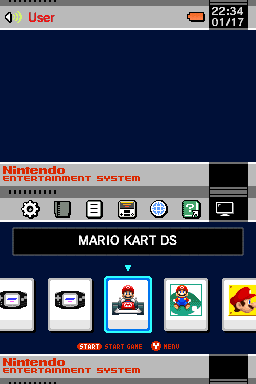
NES Classic
A NES Classic-inspired launcher presentation with custom sounds and music.
Hardware: DS / DS Lite flashcart · DSi / XL · 3DS via TWiLight
Setup & prerequisites
- Extract the theme’s own directory into /_nds/TWiLightMenu/3dsmenu/themes/ on the storage used by TWiLight Menu++. Retain the original theme directory name.
- Hold SELECT while starting TWiLight, choose the 3DS user interface under GUI Settings, then select this Custom Theme and press B to apply.
Requires a working TWiLight Menu++ installation. “3DS” identifies its interface rather than an exclusive console model. This is launcher artwork and settings; it does not install system firmware.
Files, sizes & SHA-256
- NES Classic.7z
- v1.01 · 2,186,351 bytes · 7z → theme
- SHA-256
f7675cfc7cd4ea10b738f9ef37f9891d2124b91fee0e4346b8b652b8a6b3cc58- Original ready file
- Publisher download
LetsGoAway · official NES Classic preview via DS-Homebrew

Atmosphère
A DSi-interface skin inspired by Atmosphère’s visual design.
Hardware: DS / DS Lite flashcart · DSi / XL · 3DS via TWiLight
Setup & prerequisites
- Extract the theme’s own directory into /_nds/TWiLightMenu/dsimenu/themes/ on the storage used by TWiLight Menu++. Retain the original theme directory name.
- Hold SELECT while starting TWiLight, choose the DSi user interface under GUI Settings, then select this Custom Theme and press B to apply.
Requires a working TWiLight Menu++ installation. “DSi” identifies its interface rather than an exclusive console model. This is launcher artwork and settings; it does not install system firmware.
Files, sizes & SHA-256
- atmosphere.7z
- v1.0.0 · 57,796 bytes · 7z → theme
- SHA-256
fb24106df29eb64f378ad7318e3652216f2627913924c503d1a9e8c89766c9d9- Original ready file
- Publisher download
KNBnoob1 · official Atmosphère preview via DS-Homebrew