PS Vita · Plugins & controls

Shell displays and controller plugins, with the exact taiHEN configuration and firmware notes retained.

Plugins & controls

Shell displays and controller plugins, with the exact taiHEN configuration and firmware notes retained.

4 projects

Author releases · checked 2 November 2026

Kernel plugin

PSVshell

1.1 stable
  • Native Vita
  • SKPRX
  • Plugins
PSVshell · official project screenshot

An on-screen CPU, GPU, memory and FPS monitor with optional per-app clock profiles.

Compatibility
Stable 1.1 · author supports firmware 3.60 and 3.65 only. Newer 1.2beta is a separate pre-release.
Before installing
taiHEN on supported firmware. Use one active tai config and preserve its existing entries.
Game data
No game data required
Setup & storage paths
  1. Copy PSVshell.skprx to ur0:tai/. In your active tai configuration, add ur0:tai/PSVshell.skprx beneath *KERNEL.
  2. Restart the Vita. SELECT + UP or SELECT + DOWN cycles the display modes.
  3. Leave clock settings at Default for monitoring. Manual frequencies and per-game/global profiles are optional; this page makes no measured performance claim.
ur0:tai/PSVshell.skprxur0:tai/config.txt
File details & SHA-256 · 1 file
PSVshell.skprx
1.1 stable · 32,732 bytes
032b77c2863f93895343b23132e325c12299d478a6e7a3417a114722f034c63eOfficial source file

Project by Electry.
Screenshot: Electry · official PSVshell HUD screenshot

Shell plugin

shellbat

r10
  • Native Vita
  • SUPRX
  • Plugins
shellbat · official project screenshot

Adds a numeric battery percentage to the Vita's system status bar.

Compatibility
Handheld Vita. r10 source lists retail 3.55 / 3.60 / 3.65 / 3.67 / 3.68 shells; no 3.69+ claim.
Before installing
taiHEN; battery display has no useful function on PS TV. Firmware identification is not a jailbreak support claim.
Game data
No game data required
Setup & storage paths
  1. Put shellbat.suprx in your active tai folder. This page uses ur0:tai/; the author's example uses ux0:tai/.
  2. Add ur0:tai/shellbat.suprx beneath *main in ur0:tai/config.txt, adapting both paths consistently if your active configuration is ux0:tai/config.txt.
  3. Restart and check the status bar. Do not infer support for newer firmware from the r10 label.
ur0:tai/shellbat.suprxur0:tai/config.txt
File details & SHA-256 · 1 file
shellbat.suprx
r10 · 3,014 bytes
d169ca70683795dd7257998f55c8b922b664343bf1d45bc0cf146a94bccb38ecOfficial source file

Project by nowrep.
Screenshot: nowrep · official shellbat screenshot (MIT repository)

Kernel plugin

ds34vita

1.1
  • Native Vita
  • SKPRX
  • Plugins

Connect DS3, DS4 or DualSense controllers to the Vita, with up to two controllers supported.

Compatibility
Vita taiHEN plugin; author provides no numeric firmware range. Controller pairing limitations are documented.
Before installing
A supported Bluetooth controller and taiHEN. Remove conflicting controller plugins according to the author's notes.
Game data
No game data required
Setup & storage paths
  1. Copy ds34vita.skprx to ur0:tai/ and add its path beneath *KERNEL in the active tai config.
  2. If using reVita, put ds34vita after reVita. Restart and follow the author's controller-specific Bluetooth pairing procedure.
  3. DS4 pairs with SHARE + PS and DualSense with CREATE + PS. DS3 requires its host Bluetooth address to be set by the pairing procedure; vibration is not supported.
ur0:tai/ds34vita.skprxur0:tai/config.txt
File details & SHA-256 · 1 file
ds34vita.skprx
1.1 · 12,618 bytes
5212c4460d105d417829419df8ef5abc803ff13b1332f991263e6ea4ee412fb6Official source file

Project by MERLev / xerpi / TheFloW.

Kernel plugin

reVita

1.0.8
  • Native Vita
  • SKPRX
  • SUPRX
  • Plugins
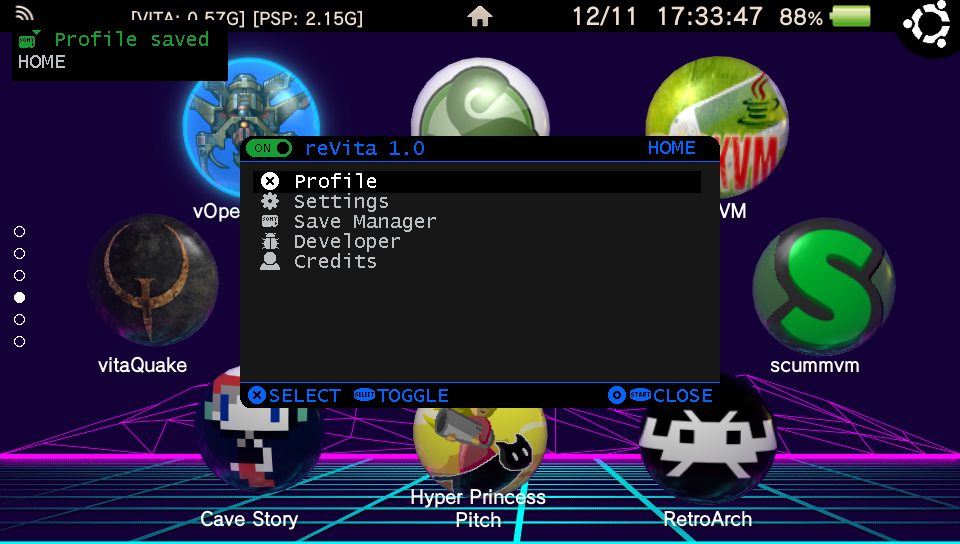
reVita · official project screenshot

Remap buttons, touch and sticks, set turbo actions and save profiles for native games and Adrenaline.

Compatibility
Vita / PS TV on 3.60 or 3.65 only. Adrenaline menu needs a graphics filter other than Original.
Before installing
taiHEN and the required ioplus.skprx below. Optional reVitaMotion.suprx adds gyro support.
Game data
No game data required
Setup & storage paths
  1. Copy ioplus.skprx and reVita.skprx to ur0:tai/. Add both paths beneath *KERNEL in the active tai config: ioplus first, reVita second, then ds34vita if present.
  2. Restart. START + SQUARE opens the remapping menu; profiles and HOTKEYS.ini are stored in ux0:data/reVita/.
  3. For optional gyro setup, copy reVitaMotion.suprx to ur0:tai/ and follow the author's SceShell/main section configuration instructions.
ur0:tai/reVita.skprxur0:tai/ioplus.skprxux0:data/reVita/
File details & SHA-256 · 3 files
reVita.skprx
1.0.8 · 86,609 bytes
64a6dc604bd251a25fc0ce15e3a30e7422f3987191aac5c16174a5e00df28e09Official source file
ioplus.skprx
1.0 · 1,849 bytes
a3b149ef17407483db1ee2419c9ca186550b16614c7f3a1c1343cafe8728fdadOfficial source file
reVitaMotion.suprx
1.0.8 · 5,878 bytes
d6242a39b88434c22e8ba14a3e245f7e5a80970b1175b2fcf4eaa1371e92a6efOfficial source file

Project by MERLev.
Screenshot: MERLev · official reVita menu screenshot

Install & storage paths

  1. Prepare your model and firmwareUse the existing Vita jailbreak and CFW guides first. Do not change firmware just to match a download. Numeric support is listed only where the author provides it. Vita 1000 needs usable memory-card storage; Vita 2000 and PS TV have internal storage.
  2. Move a VPK using VitaShellUse VitaShell USB or FTP from your computer. ux0: is the active user-storage mount, whether it is an official card, internal storage or correctly configured SD2Vita. A folder such as ux0:downloads/ is a suggested transfer location.
  3. Install the package, then add its dataOpen the VPK in VitaShell and complete the installation prompts. Data ZIPs are not installable VPKs: extract each one at the specific destination on its card, preserving folder names.
  4. Add plugins to the active tai configurationBack up the active config before editing. Kernel SKPRX entries use *KERNEL; shell/user SUPRX entries use their author-specified section. ur0:tai/config.txt is the normal location on this site’s Ensō setup. If ux0:tai/config.txt is active, use its folder and paths consistently. Restart after a plugin change.